Invalid type passed!
Received:
{type}
Expected one of:
{asideVariants.join(", ")}
: <>
{title &&
{title}
}
{children}
}
;
};
With Mate's fast and reliable hosting, developers can effectively manage static
assets for their mini applications. Delivering static files efficiently and
securely is vital for optimal performance.
By utilizing a Content Delivery Network (CDN), Mate's hosting boosts reliability
and accelerates file loading for users across various regions, surpassing the
performance of single-server solutions.
The hosting service is free, though there are some limitations on data transfer.
### Important recommendation
When deploying an SPA on a static hosting platform (like Mate's hosting), it’s crucial to choose
routing methods that do not depend on server-side configurations.
Hash-based routing (using the `#` symbol in URLs) is a simple and effective way to manage routes without needing server support. Many frameworks offer built-in solutions or plugins to implement this type of routing.
For instance, if you are using *React*, use `HashRouter` instead of `BrowserRouter`:
```jsx theme={null}
import { HashRouter as Router, Route, Switch } from 'react-router-dom';
function App() {
return (
{/* Other routes */}
);
}
export default App;
```
## Features
### Lightning Speed
The crucial feature of Mate's hosting is its well-configured Content Delivery
Network spread across the world, in countries where mini applications are
commonly used. This feature allows developers to focus on building their
applications rather than worrying about how to deliver static assets as quickly
as possible.
### Version Management System
Another notable hosting feature is the version management system.
Mate allows the creation of up to five deployment tags, enabling developers to
deploy the project with a specific tag without affecting previously deployed
assets.
#### Usage Example
A common use case here is when the project has two versions: `latest` and
`staging`. The developer can use the `latest` version for production and
`staging` for the Quality Assurance team.
After deploying the `staging` assets, the QA team checks if this staging state
is acceptable. Then, the same assets can be deployed with the `latest` tag for
production.
#### About Base URL
When deploying static assets, Mate uses the following base URL pattern:
```
https://{storage_key}.tapps.global/{tag}
```
Here’s some information on these parameters for clarification:
* `storage_key`: a unique key for the deployed project. This value is
non-configurable and is assigned to the project upon creation.
* `tag`: a deployment tag. This value is set during the deployment process by
the developer. Examples include `staging`, `latest`, `dev`, etc.
## Getting started
### Register a project
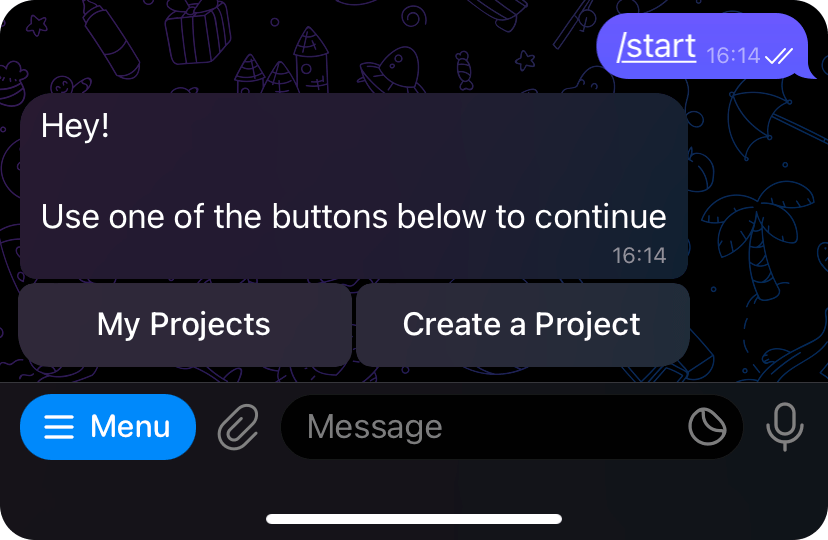
To start using the hosting functionality, you must register the project and
obtain its deployment token. To get the token, go
to [`@tma_mate_bot`](https://t.me/tma_mate_bot) and press the `Start` button to
begin the conversation with the bot.
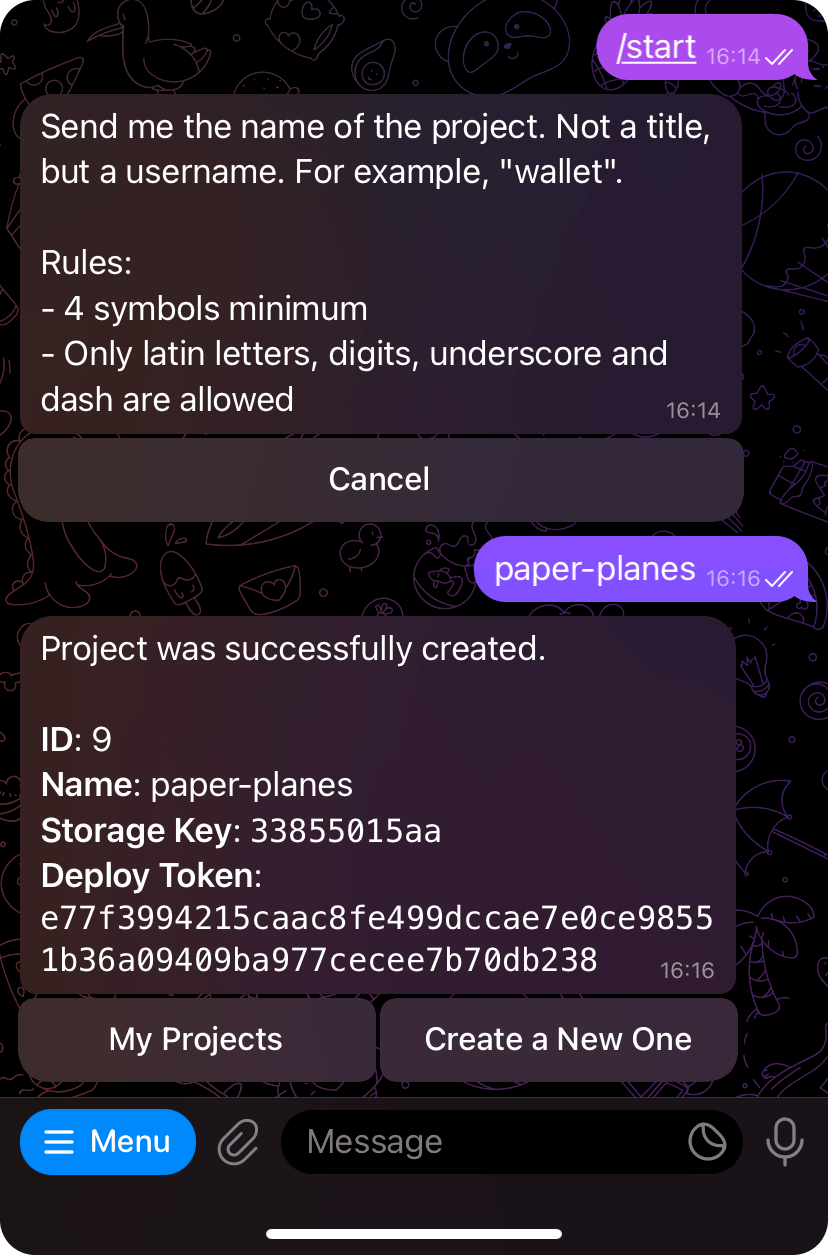
Next, press the `Create a Project` button and enter the title of the project to
be created, following the specified rules.
After this step, the bot will return the created project information, including
the **deployment token**.
### Update the static assets base URL
Before deploying the project, ensure that all static assets have a valid base
URL. You can learn more about how Mate generates the static assets base
URL [here](#about-base-url).
To retrieve the project deployment information using a specific tag, use the
following command:
```bash theme={null}
mate deploy info \
--token {DEPLOYMENT_TOKEN} \
--project {PROJECT_ID} \
--tag {TAG}
```
Here, the `DEPLOYMENT_TOKEN` and `PROJECT_ID` values refer to the deployment
token and project identifier received from the previous step. `TAG` is a
deployment version tag name.
Output example:
```
✔ Fetched deploy information for paper-planes (id 48) project
Project Title: paper-planes
Short title of the project
--------
Base Path (using tag "staging"): https://35f105bd6b.tapps.global/staging
This path will be used as a base path for the uploaded assets associated with this project.
Consider using this value as a base path in your bundler. You can also use different tags using the --tag option.
--------
Allowed file extensions: html, css, js, cjs, mjs, png, jpg, jpeg, webp, ttf, woff, woff2, eot, json, ico
Files extensions that are allowed to be uploaded.
--------
Maximum size: 10485760 bytes
Maximum upload size.
--------
Maximum files count: 100
Maximum number of files a single upload can contain.
```
The value `https://35f105bd6b.tapps.global/staging` is the base URL that should
be used in the project bundler.
Here’s how it can be applied using [Vite](https://vitejs.dev).
```ts theme={null}
import { defineConfig } from 'vite';
export default defineConfig({
base: 'https://35f105bd6b.tapps.global/staging'
});
```
### Deploy the project
To deploy the project, Mate requires specifying a folder to be uploaded to the
hosting service. The folder must only contain files that can be opened by the
user's browser, so no source files or files for different purposes should be
present in the directory.
Let’s assume the following conditions:
* A project with ID `48` and token `aabbccdd` was created.
* A folder named `dist` contains all the mini application built static assets.
* It is required to deploy the static assets with the tag `latest`.
To deploy the project under these conditions, run the following command:
```bash theme={null}
mate deploy upload \
--dir dist \
--token TOKEN \
--project 48 \
--tag latest
```
Here’s the possible output:
```
✔ Fetched deploy information for paper-planes (id 48) project
i Assets base path (using tag "latest"):
https://35f105bd6b.tapps.global/latest
i Allowed file extensions: html, css, js, cjs, mjs, png, jpg, jpeg, webp, ttf, woff, woff2, eot, json, ico
i Maximum upload size: 10485760 bytes
i Maximum files count: 100
✔ Directory compressed successfully from 24185 to 7168 bytes
✔ Archive uploaded successfully
📁 dist
╰ 📄 index.js (https://35f105bd6b.tapps.global/latest/index.js)
```
> \[!WARNING]
> The deployed directory must include only standard files and directories,
> excluding private ones (starting with the `.` symbol). All other types of
> files (such as symlinks) are forbidden. If found during the deployment process,
> the CLI tool will throw a corresponding error.
### Verify deployment and configure TMA
After deploying, it’s recommended to verify that your application is working correctly
by accessing it via the direct link:
```
https://{storage_key}.tapps.global/{tag}/index.html
```
If everything functions properly, use this link as the web app URL when creating your Telegram mini-app.
**Example:**
If your `storage_key` is `35f105bd6b` and your tag is `latest`, the link will look like this:
```
https://35f105bd6b.tapps.global/latest/index.html
```
Ensure that when you navigate to this link, your application loads and operates without errors. This guarantees that your Telegram mini-app will work correctly with your hosting setup.
## Using config
To avoid repeatedly specifying parameters, Mate allows creating a special
configuration with all the parameters included.
To start using the Mate config along with the optional commands' options,
create the `mate.yml` or `mate.json` file in the project root directory
with the following example content:
```yml theme={null}
deploy:
projectId: 48
directory: dist
token: TOKEN
tag: latest
```
```json theme={null}
{
"deploy": {
"projectId": 48,
"directory": "dist",
"token": "TOKEN",
"tag": "latest"
}
}
```
Then, the `info` and `upload` commands will retrieve the values from the
configuration.
```sh theme={null}
# Both of these commands will use
# the options from the Mate config prior:
# --project = 48
# --dir "dist"
# --token "TOKEN"
# --tag "latest"
mate deploy info
mate deploy upload
```
If any parameter override is required, it should be specified in the command.
For example, to override the `tag` option with the `staging` value, use the
following command:
```sh theme={null}
mate deploy info --tag staging
```